Snake V1 Part III: The Game
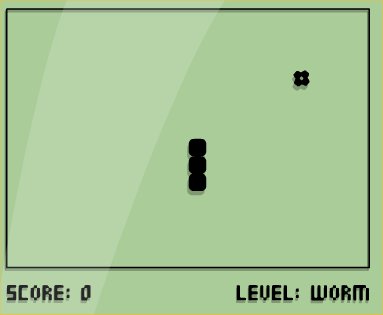
We left the Snake moving freely with keyboard controls but without any type of boundaries, so we need to add some restrictions: the end of game conditions.
This is, when the snake hits the walls of the plane or with its own body, the game finishes and restart. We also have to add the gameplay elements, like the food that randomly appears and we have to “eat” in order to earn points. We will also add a little score counter to know how many cells we eat.
Game Boundaries
The end of game conditions are really easy. Basically we need to know if the head of the snake is outside the limits of our game space:
// End game conditions
 // Restart the game if it's outside the plane
 if(nx == -1 || nx == w/cw || ny == -1 || ny == h/cw)
 {
    // Restart game
    init();

    return;
 }
If the x positoin is -1 it means it went off in the left side of the plane, and if it’s w/cw it means it went off by the right. w is the width of the plane and cw is the size in pixels of every cell, as stated in the previous post, so if it is outside the range of cells in the plane, it’s over (w/cw it’s the range, the quantity of cells that we have in the game space, 50 in our case). For y it’s the same, -1 it’s outside at the top side and h/cw it’s outside at the bottom. This is a really basic implementation of what is called collision detection, being a really old method to it (but enough and efficient for this particular case). We do this checks on the paint() function, as we have to check every time the snake is painted, and we need to do it before it gets painted too, to avoid bugs.
Self Collissions
All it’s left is to check self collisions. We need to check if the snake hits itself, as until now it could pass through its own body. For this we create a function that checks this collisions:
function check_collision(x, y, array)
{
// Check if x and y coordinates exists in a cells array
    for(var i = 0; i < array.length; i++)
    {
        if(array[i].x == x && array[i].y == y)
        return true;
    }
return false;
}
And we add this collision condition to the ones we already had:
 // End game conditions
 // Restart the game if it's outside the plane
 if(nx == -1 || nx == w/cw || ny == -1 || ny == h/cw || check_collision(nx,  ny, snake_array))
 {
    // Restart game
    init();

    return;
 }
## Restart the Game
The problem is that we have yet a way to restart the game: until now it just worked in the same conditions. To do this we create the init() function that we will call when we restart:
 function init()
{
    d = "right"; // Direction of the movement. By default right
    create_snake();

    // To move the snake we use a timer that will call the
    // paint() function every 60ms
    if(typeof game_loop != "undefined")
        clearInterval(game_loop);
        game_loop = setInterval(paint, 60);
    }
}
The only thing we do here is to refactor and organize some parts of the code we had earlier, like the initialization of the default direction and the creation of a new snake. The direction needs to be global so we declare it outside ìnit().
The most important thing here is the timer game_loop. We haven’t defined game_loop anywhere else so it shouldn’t do anything by default, and the only time we call setInterval() is here. This is done to coordinate the refresh time. Every time the game is restarted, the refresh rate will be constant and won’t depend on the state the game ended after the last collision. This way if the collision happens in an unfinished frame, it won’t interfere with the next game as we clean the state and start over.
The Food
Now the food. We start by, well, creating it:
 function create_food()
 {
 food = {
 x: Math.random()*(w-cw)/cw,
 y: Math.random()*(h-cw)/cw,
 };
 // This will create a cell (food{}) with x and y values
 // and it will create it between 0 and w-cw or h-cw, meaning inside the plane
 }
We create a new cell called food with two fields: x and y, and we fill it with the Math.random() function to get random positions. To limit the range in which those random number are generated we multiply them by the dimension of the plane: (w-cw)/cw (the division is necessary because the cells are bigger than 1px).
We have the cell with its position information. Now it’s time to paint it (inside paint()). To do that, since we have to paint cells constantly (when creating the snake and creating food), it’s time to refactor and create a new function:
function paint_cell(x, y)
 {
 ctx.fillStyle = "blue";
 ctx.fillRect(x*cw, y*cw, cw, cw);
 ctx.strokeStyle = "white";
 ctx.strokeRect(x*cw, y*cw, cw, cw);
 }
We do this by taking the code we used before in the loop to paint the snake inside paint(). So now we have to replace that code with a call to this function in the loop:
function paint() {

... previous code

// Paint the snake
 for(var i = 0; i < snake_array.length; i++)
 {
 var c = snake_array[i];
 paint_cell(c.x, c.y);
 }

... next code

}
Now to paint the food we need to do more things. First we create a global variable (var food()) to contain it. Then we create a call to create_food() on init() to create a cell on start, and finally a call to paint_cell() on paint() with the fields of the newly created variable to paint it:
function init()
 {
 d = "right"; // Direction of the movement, to the right by default
 create_snake(); //Create the snake
 create_food();

 // To move the snake we create a timer that will call
 // the paint() function every 60ms
 if(typeof game_loop != "undefined") clearInterval(game_loop);
 game_loop = setInterval(paint, 60);
 }
The paint() function with the call to paint_cell()
function paint() {

... previous code

// Paint the snake
 for(var i = 0; i < snake_array.length; i++)
 {
 var c = snake_array[i];
 paint_cell(c.x, c.y);
 }

 // Paint the food
 paint_cell(food.x, food.y);

... next code

}
Now we need no make the snake eat the food, so we have to modify paint(). Before we had:
 var tail = snake_array.pop(); // Pop and store the tail
 tail.x = nx; tail.y = ny; // Assign the tail the position of the head
 snake_array.unshift(tail); // Insert the tail in the first position
And we change it to:
// If the new position of the head it's the same as the food
// We create a new head instead of moving the tail
 if(nx == food.x && ny == food.y)
 {
 var tail = {x: nx, y: ny};
 // Create new food
 create_food();
 }
 else
 {
 var tail = snake_array.pop(); // Pop and store the tail
 tail.x = nx; tail.y = ny; // Assign the tail the position of the head
 }
 // The snake has "eaten" the new cell

 snake_array.unshift(tail); // And now we insert the tail in the first position
When moving the snake, the first think that is calculated is the position of the head. This time, instead of moving it directly, we check. If it’s the same as the food, instead of removing the tail and putting it to the head, we add the new cell, create a new head instead of moving the previous and, of course, create new food. This means assigning new values to tail, not making the pop() to remove it from the end and after that we add it to the front with unshift().
To finish this V1 we will show a little score text that counts the food we eat.
For that we create the variable score:
var score;
Initialize it in init():
function init()
 {
 d = "right"; // Direction of the movement, to the right by default
 create_snake(); //Create the snake
 create_food();

 score = 0;

 // To move the snake we create a timer that will call
 // the paint() function every 60ms
 if(typeof game_loop != "undefined") clearInterval(game_loop);
 game_loop = setInterval(paint, 60);
 }
We increment it when we eat:
// If the new position of the head it's the same as the food
// We create a new head instead of moving the tail
 if(nx == food.x && ny == food.y)
 {
 var tail = {x: nx, y: ny};
 score++;

 // Create new food
 create_food();
 }
And we add it to paint() at the end to show the score:
// Paint the score
 var score_text = "Score: " + score;
 ctx.fillText(score_text, 5, h-5);
With fillText() we paint texts on the canvas, passing as arguments a string and the x and y positions of the bottom left corner of the text to show.
And that’s it. With less than 150 lines of code (it can be much less if we want actually) we have a working classic. For now is ugly and don’t have anything fancy what it have is the essential: a game.
This first version was about gameplay. In the future we can add menus, score tables, lives, levels, bonuses, pause, game modes and lots and lots of other things. But they are just superficial ornaments built over this core gameplay we have coded now.
I hope you enjoyed and learnt something useful. See you on next projects!
Index
- Introduction
- The Snake
- The Game